


Table of Contents
The professionals of today are dealing with a huge load of work, communication, and information every day. It is required to learn how to manage their tasks efficiently and get the best results without wasting any time at all. While some choose the traditional method of project management, others use apps to increase productivity.
There have been studies conducted regarding the lost working time of people at work. Some have found out that employees lose quite a lot of time weekly looking for information, switching platforms, and performing repetitive actions. By using the proper productivity app, one can save time and spend it doing something more useful instead.
Why Productivity Tools Are Important
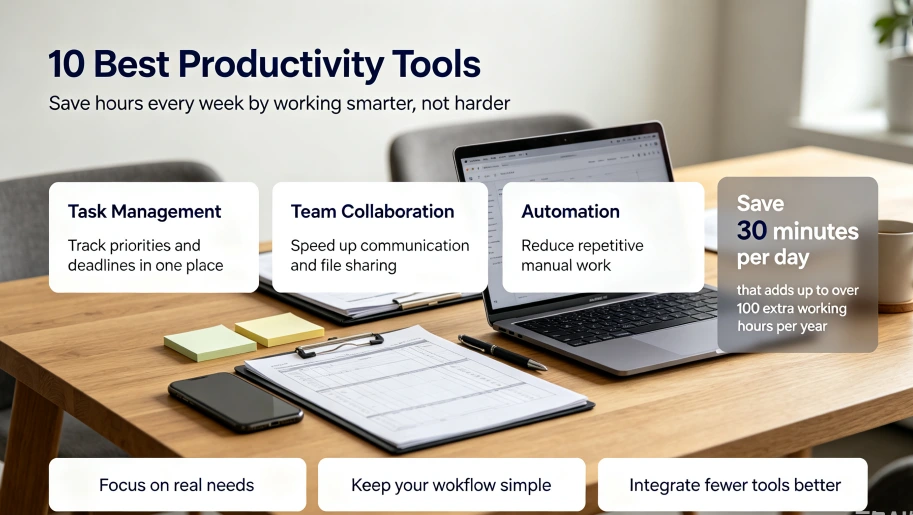
Productivity tools help solve common workplace problems such as missed deadlines, scattered information, and inefficient communication. A suitable digital workflow can improve efficiency in several areas:
| Productivity Need | Common Problem | Tool Function |
| Task Management | Difficult to track priorities | Organizes tasks and deadlines |
| Team Collaboration | Slow communication | Improves information sharing |
| Automation | Repetitive manual work | Reduces time-consuming operations |
Saving only 30 minutes per day can provide more than 100 additional working hours every year. This extra time can be used for strategic planning, creativity, and professional growth.
10 Best Productivity Tools for Better Efficiency
1. Notion: Flexible All-in-One Workspace
Notion is a combination of various features like note-taking, database management, task management, and documentation. It enables the user to create their task board, meeting notes, calendar, and knowledge base.
The flexibility of its structure makes Notion suitable for both personal use as well as for marketing teams and businesses requiring an information management system.
2. Trello: Simple Visual Task Management
Trello uses boards, lists, and cards to organize workflows visually. It is especially useful for users who prefer a clear overview of project progress.
With Trello, teams can easily track:
- Upcoming tasks
- Ongoing projects
- Completed work
This visual approach helps identify delays and improve task organization.
3. Asana: Managing Team Projects Efficiently
Asana is made specifically for project management in situations that have a lot of complexity. The software lets users delegate work, provide deadlines, and track the progress of their projects.
With many projects being handled, Asana helps improve accountability within the firm.
4. Todoist: Smart Daily Task Planning
Todoist is more concerned with personal productivity and organization. It includes priority setting, reminder setting, recurring tasks, and productivity tracking features.
One can easily jot down their thoughts and turn them into a plan of action, which makes it helpful for busy professionals.
5. Evernote: Organized Note-Taking
Evernote is a service that enables its users to save vital information such as documents, minutes from meetings, notes for research, and ideas.
A good note-taking service saves time looking for information and gives easy access to important information at any time.
6. Slack: Improving Team Communication
Slack facilitates organized channels of communication for various projects and departments. It offers quicker communication than the conventional use of email.
Furthermore, teams can use Slack in conjunction with other workplace applications to facilitate seamless workflow.
7. Google Workspace: Cloud-Based Collaboration
Google Workspace provides tools such as Docs, Sheets, Drive, and Meet for online collaboration.
| Tool | Main Purpose |
| Google Docs | Document editing |
| Google Sheets | Data management |
| Google Drive | File storage |
| Google Meet | Online meetings |
Real-time editing and cloud access help remote teams work efficiently without file version conflicts.
8. Zapier: Automating Repetitive Work
Zapier acts as an intermediary for different apps and automates workflows without programming knowledge.
For instance, people could automatically archive email attachments, generate tasks based on forms, or move customer information across applications. Automation eliminates manual tasks and enhances productivity.
9. Grammarly: Faster and Better Writing
Grammarly improves the quality of one’s writing through grammar, clarity, tone, and sentence structure checks. It can be used by people who write a lot of emails and business-related documents.
The efficiency of communication is achieved by saving time in editing thanks to writing assistants.
10. RescueTime: Tracking Work Habits
RescueTime analyses time usage by users for applications and websites. It generates reports that aid in identifying issues of productivity.
Knowing how time is used helps individuals adapt their behavior and develop better working methods.
.webp)
How to Select the Right Productivity Tools
Choosing productivity software depends on specific workflow requirements. Before adopting a tool, users should consider the main challenges they want to solve.
Focus on Actual Needs
A good productivity system should support real work processes instead of adding unnecessary complexity. For example:
- Use task management tools for planning and deadlines
- Use collaboration platforms for team communication
- Use automation tools for repetitive tasks
Avoid Overusing Software
Overuse of applications may lead to extra problems. The solution is to have several perfectly integrated tools at once rather than many separate applications.
Complexity should not be the aim when developing productivity software.
Future Development of Productivity Tools
Productivity tools are becoming increasingly intelligent due to the emergence of AI and automation. Modern tools can not only process information but also create text, analyze data, and make suggestions regarding workflow optimization.
In the future, productivity applications will become more personalized and assist users in organizing their schedule and managing tasks.
Final Thoughts
The effectiveness of productivity tools can be greatly enhanced if they fit well with the user’s working style and his/her business requirements. Software like Notion, Trello, Asana, and automation tools enable us to cut down waste time and streamline work processes.
These tools don’t just aim to do things for the sake of it. Rather, they are designed to optimize our working processes. If we choose the correct tools and develop good digital habits, we can easily save hours every week.
0